Core Concepts
Tenants
DI is a multi-tenant system. Think of a Tenant as a problem space. It’s easier to explain on examples of existing DI tenants:
- Presales Archive - this tenant has all the knowledge extracted from past presales deals. Opportunities from multiple potential and existing clients that we have responded to by engaging one of our presales teams
- Presales - very similar to Presales Archive but connected to the OneCRM and giving you access to the opportunities as they are processed in real-time
- Contracts - this tenant has all the knowledge extracted from the SOWs and their addendums
- Production Projects - as the name suggests, this is knowledge extracted from projects we executed. We read into people experiences reported on their profiles as well as descriptions from CRM, Delivery Central, and positions for the key roles
- Case Studies - as the name suggests, this tenant is all about our case studies.
We do not read any document into a generic RAG storage. We make an effort to know what we are reading and apply tenant-specific processing (customized prompts, customized extractions, different set of attributes and summaries, different configuration for what to search in, etc.)
Entities
Tenants house entities. Entities are the primary organizational units in DI.
Entity is a logical grouping of documents that define one specific thing. We called that thing an entity.
Just like with tenants, it’s easier to explain what an entity is on examples:
- In Presales Archive, an entity is a deal. It’s defined by all the input documents we received from a client (think an RFP though it’s rarely a single document) as well as all the documents that we produced in response (think a response though it’s again rarely a single document)
- In Contracts, an entity is a contract. It’s defined by the SOWs along with all its amendments and the governing MSA.
- In Production Projects, an entity is a project (think project code in EPAM terminology). Projects are defined by a collection of documents that we construct out of various structured and unstructured data that we can find - individual experiences reported by our employees on their profiles, descriptions from the CRM and projects.epam.com, SOW summaries from the Contracts tenant if we have it.
- In Case Studies, an entity is a case study. 99% of the cases it’s a single PPT document that we downloaded from the presales.epam.com
- In Presales, an entity is a deal. It’s exactly the same as in Presales Archive, we just get the content from a different place
Documents
Documents is what gave the name to the product. The only place we get the information out of is documents.
Documents grouped together into a logical unit that represents a thing that makes sense in context of a tenant make an entity.
A document is very straightforward. We either grabbed it from an external storage (e.g. SharePoint) and it’s a .pptx or a .docx or an .xlsx or an .eml, or we created a markdown document out of structured data from datahub.epam.com . Documents (as well as images out of them) is what we feed into the LLM to get the extractions that later help us give you the knowledge that you need
Slides
You probably think of slides as PowerPoint slides. You are not wrong but we call any document’s page - a slide. When a document is a PowerPoint document, your understanding matches ours. When a document is a .docx, for example, every page of that document is a slide. .xlsx documents do not have slides. Oops 😊 Here is the thing. We use visual LLM to read documents. We have been through several iterations and found that Gemini is exceptionally good at OCR. If we were running 100x volume, we would probably reconsider our choice of an OCR tools. On our current volume, however, using LLM to get the markdown out of documents of various formats preserving the semantic (bullet points, headers, tables) is a good choice. So we convert everything that is not a PDF into a PDF, slice it into individual images, one per page (good old unix poppler can do that in a single CLI command), call them slides, and send them to the LLM to be converted into markdown text.
When a document is a .pptx, a slide that is a page becomes a slide that you know. When you prompt for slides in your conversations with DI, we will only surface the PowerPoint slides. We realized that your understanding of what a slide is will always trump ours 😊, so the only slides we expose to the search index and the search queries are the slides from the PowerPoint documents.
Images
Some documents have images embedded into them. This is very common for PowerPoint presentations. It’s also very common for .docx that our presales teams produce in response to client’s RFPs. Contracts do not (or should not) have images so image extraction is configurable per tenant. You can prompt for slides and images when you want to see visuals. Know that images you see come from the documents.
When an image happens to be a standalone document, that image will not be the image I am talking about here. That standalone image is a document that is also a slide but is not an image. (I wrote this sentence specifically to see you smile 😊)
Attributes
You will see the word attributes when you look at the Entity details page in DI. We distinguish between two types of attributes:
- There are attributes known to us at the time of entity loading. These attributes come from the structured data. Things like a
project codeor aclient name. - There are attributes that we extract from the documents using LLM and our prompts. We call these attributes extractions internally and in our data representation. We call them
attributesin the UI because you probably don’t really need to know where each attribute is coming from.
Summaries
All summaries are LLM-extracted. Summaries is what you see when you look at the Entity details screen. Each summary has a name and summaries are organized into groups for better readability. We create a few system summaries that are only visible to administrators and play a very important role in how DI works. For example, when we search, we do not search in documents. We do not do a traditional RAG. Instead, when an agent needs to perform a semantic search, it will rephrase the question into something more palatable and run a vector search using that rephrased question against a special purpose search summary. You won’t see it but it’s cool to know, is it not?
Collections
I am so happy that you stayed with me and read this far. Collections may be the most powerful thing that DI has to offer after the cross-tenant conversational agentic search. Collections allow you to pin things you found and considered relevant and create a knowledge bubble. I am calling it a bubble because you can go and have a conversation specifically focused and zeroed in only on the entities and images and people that you found relevant. You can upload your own documents to make your collection richer. You can also share a collection with other employees and collaborate together.
Browse
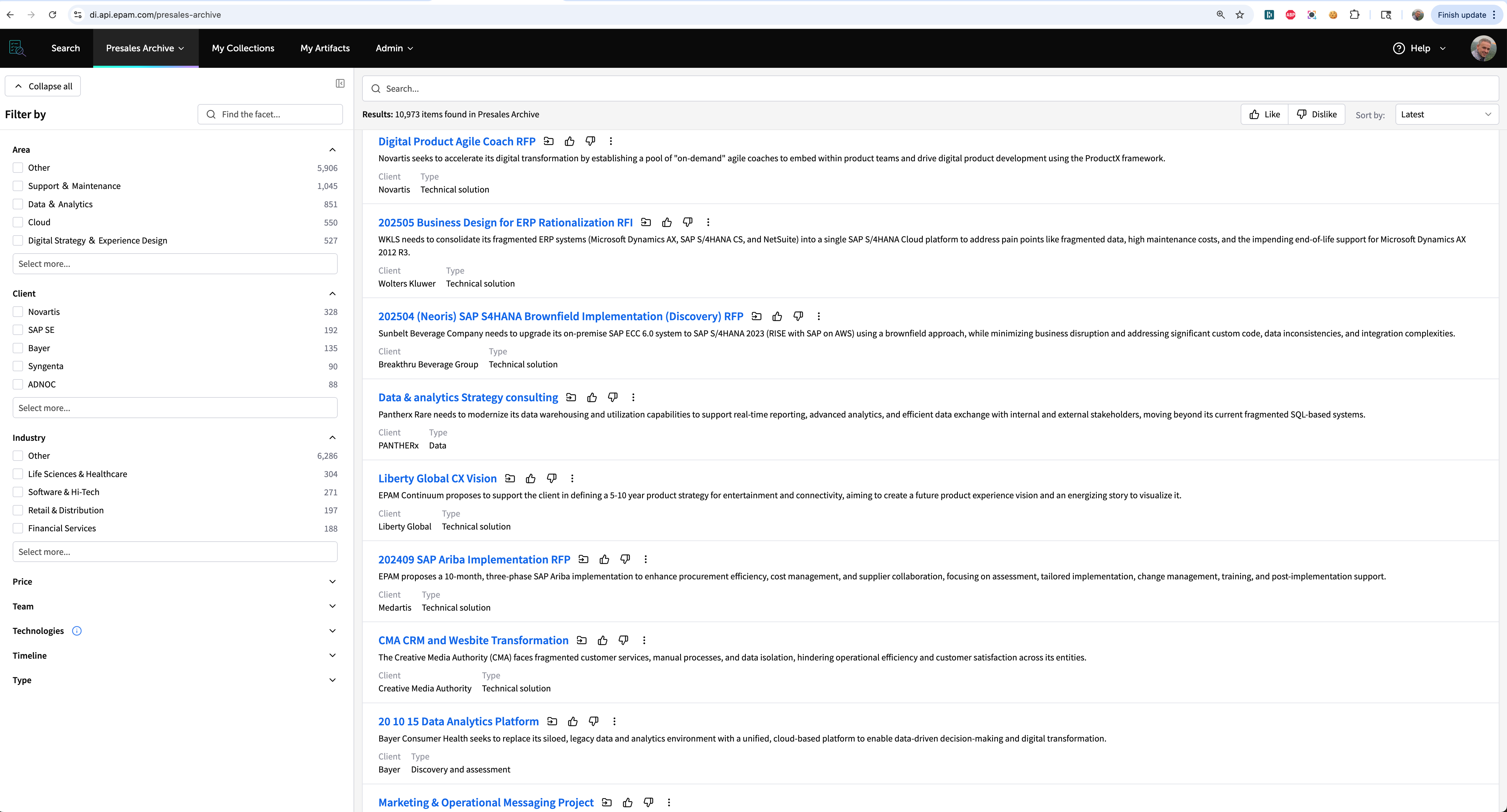
The main tenant’s interface with the facets on the left, the search bar up top, and the list of matching entities in the main content area is called the browser. When you use this interface, you are browsing DI. We do not call this experience search even though it feels like you are searching. You are browsing.
Search
The search is the pinnacle of DI. This is the cross-tenant conversational chat interface that allows you to communicate with DI in natural language. This is where you can prompt for relevant experience, visuals depicting particular architectures, or anything else really. Please read how to Maximize the Value of Documents Intelligence to know how to search and when to browse